AcademicHub

AcademicHub








🎓🔗 AcademicHub: Streamline student connectivity and insights with powerful features. 📊
Live Demo 👇:
🚀 Quick Contribution Info
Want to contribute to this project?
- ✅ Fork this repository
- ✅ Apply to contribute: https://academichub.stuffs.me/contribute/
- ✅ Check out Open Issues here: https://academichub.stuffs.me/issues/
Table Of Contents :
- About the Project
- Technologies Used
- Features
- Getting Started
- Credentials
- Screenshots
- Contributors
- Connect Me
About The Project
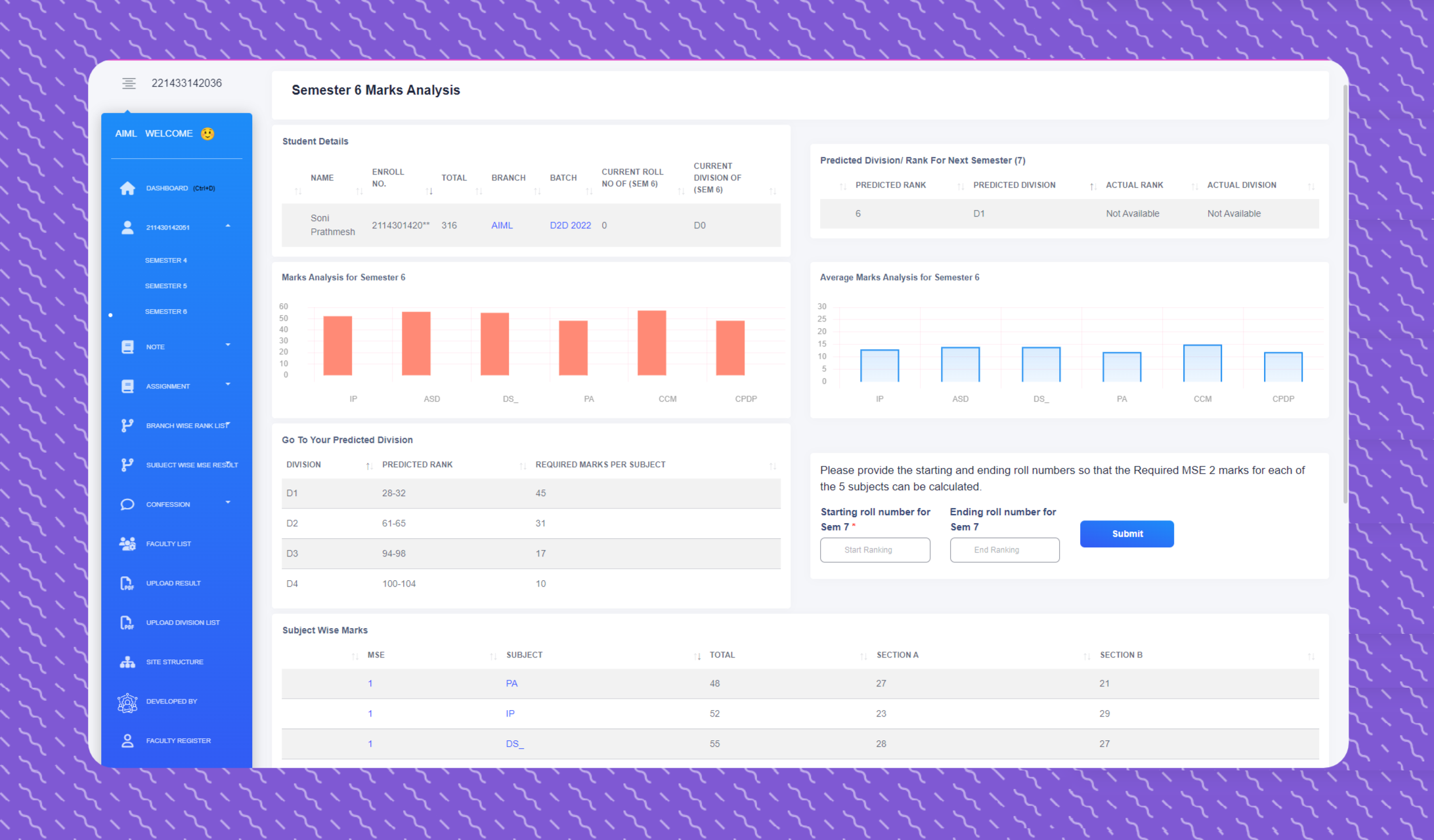
Introducing AcademicHub — a dynamic web application designed to streamline the academic journey for college students. This platform offers a comprehensive view of academic information for all students across various departments, focusing on transparency and connectivity. From academic performance insights to a dedicated confession and notes section, AcademicHub fosters a sense of community and engagement.
In addition, AcademicHub provides access to subject-wise GTU exam papers to aid in exam preparation and features a real-time chat window, enabling seamless communication between students and administrators.
Technologies Used
- Backend: Python & Django
- Data: Pandas
- Frontend: HTML, CSS, Bootstrap
- Interactivity: JavaScript, jQuery, AJAX
- Database: MySQL
- Notifications: Google Firebase
Features
-
Rank Analysis & Academic Transparency: View academic records across departments, including detailed rank analysis, semester-wise GTU performance, and academic progress.
-
Confession Page: An open, anonymous platform for students to share confessions and interact through comments, fostering campus engagement.
-
Notes and Resources: A centralised section for sharing important academic resources, including notes, assignments, and essential updates.
-
Subject Result Upload: Easily upload subject-wise results in CSV format. The system uses a PDF-to-CSV converter API and auto-inserts data into the database.
-
Real-time Notifications: Integrates with Google Firebase to send push notifications for announcements and updates.
-
Student Information Search: Search for any GTU student by enrollment number using
https://academichub.stuffs.me/<Enter-Here-any-Enrollment>/or use advanced search. -
GTU Result Search: Quickly find and download GTU results by entering your enrollment number. GitHub: https://github.com/prathmeshsoni/GTU-Result-Download
-
Result Notifications: Get instant Telegram alerts when GTU results are declared. GitHub: https://github.com/prathmeshsoni/GtuNotificationBot
-
GTU Exam Paper Search: Instantly retrieve GTU exam papers by entering the subject code.
-
Student-Admin Chat: Real-time messaging system where students and admins can communicate securely. Live: https://chat.academichub.stuffs.me/ GitHub: https://github.com/prathmeshsoni/Chat-Application/ - Company Placement Management: Dedicated section where students can view company visit details, job descriptions, recruitment processes, and see showcased profiles of placed students.
📌 This repository contains an older version. For the latest updated version, contact: info@academichub.stuffs.me or visit Contact for Code
Getting Started
This is an example of how you may give instructions on setting up your project locally. To get a local copy up and running, follow these simple example steps.
Prerequisites
Install Python 3.7 or above
Installation
👉 Step 1 - Download the code from the GH repository (using
GIT):git clone https://github.com/prathmeshsoni/AcademicHub.git && cd AcademicHub
👉 Step 2 - Create virtual environment:
python -m venv .venv
👉 Step 3 - Activating the environment:
on Windows:
.venv\Scripts\activate.bat
on Mac OS / Linux:
source .venv\Scripts\activate
👉 Step 4 - Installing dependencies:
pip install -r requirements.txt
👉 Step 5 - You can now run the development server:
python manage.py runserver
Visit http://127.0.0.1:8000 in your browser. The app should be up & running.
Default Credentials
Admin Panel: http://127.0.0.1:8000/admin/
- Username: admin
- Password: User@1234
Screenshots
Visit our Screenshots Page for a visual walkthrough of the AcademicHub Website.
Contributors
 |
 |
 |
 |
 |
 |
|---|---|---|---|---|---|
| Prathmesh | Manthan | Janak | Parshad | Vraj | Param |
The repository is a starting point for most of my professional projects; for this, I’m using it as a part of my portfolio. Feel free to use it wherever you want. I’ll be happy if you provide any feedback, code improvements or suggestions.
Connect with me at

📫 How to reach me: connect.prathmeshsoni@gmail.com
All Set :)
AcademicHub - Provided by Prathmesh Soni